Skills, Agents, and MCP Servers
- 1 Installing Claude Code
- 2 Using the Claude Code TUI
- 3 CLAUDE.md and Settings
- 4 Skills, Agents, and MCP Servers
- 5 Hooks
- 6 Plugins and Marketplaces
- 7 Agent Teams
- 8 Connecting to Other Providers
Introduction
In the previous guide we covered how CLAUDE.md gives Claude project context and how settings.json controls permissions. This guide covers the extensibility layer — the tools that let you teach Claude new capabilities and connect it to external services.
If you haven’t read the earlier guides: Installing Claude Code, Using the Claude Code TUI, CLAUDE.md and Settings.
Context is Everything
Before diving into skills, agents, and MCP servers, it’s worth understanding why they exist. It comes down to one thing: context window management.
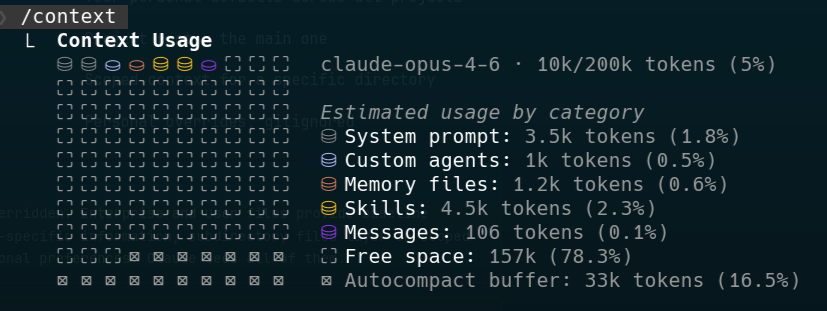
Claude’s context window is like RAM — it’s finite, and everything competes for space. Your CLAUDE.md, the conversation history, file contents Claude has read, tool descriptions, and the actual work Claude is doing all share the same pool. Research has shown that LLMs start to degrade at around 50-60% context utilisation, so you want to be efficient with what goes in.
Every MCP tool definition costs 500-2,000 tokens just to describe it. If you connect five MCP servers with ten tools each, you could burn 25,000-100,000 tokens before Claude even starts working on your task. That’s context that could have been used for actual code.
Skills and CLI tools take a different approach. Skills only load when triggered — their description sits in the frontmatter (50-100 words), and the full content only enters the context when Claude actually needs it. CLI tools cost nothing in the context window until Claude decides to run them. This is why skills and CLI tools are generally better for context utilisation than MCP servers with many tools.
You can check your current context usage at any time with the /context command. It shows you a breakdown of what’s in the context window — system prompt, CLAUDE.md files, tool definitions, conversation history, and how much space is left. Get into the habit of checking this when things start to feel sluggish or Claude’s responses seem less focused. If you’re at 50%+ utilisation, it might be time to use /compact to compress the conversation or /clear to start fresh.
/context to monitor your usage.Skills
Skills are reusable packages of knowledge and instructions that Claude loads on demand. They live in .claude/skills/ (project-level) or ~/.claude/skills/ (user-level, available across all projects).
A skill is a directory with a SKILL.md file as its entry point, a references/ folder for detailed documentation, and an optional scripts/ folder for tooling:
.claude/skills/
  deploy/
    SKILL.md
    references/
      environments.md
      rollback-process.md
    scripts/
      check-deploy-status.py
  database/
    SKILL.md
    references/
      migrations.md
      schema-conventions.md
      query-patterns.md
    scripts/
      validate-migration.py
SKILL.md Structure
Every skill has a SKILL.md with YAML frontmatter and a markdown body:
.claude/skills/deploy/SKILL.md
---
name: deploy
description: >
  This skill should be used when the user asks to "deploy",
  "release", "push to production", "ship it", or needs guidance
  on the deployment pipeline, rollback process, or environment
  configuration.
---

# Deployment

## Process

1. Run `just test` to verify all tests pass
2. Run `just build` to create production build
3. Create a release tag: `git tag -a v$(date +%Y%m%d) -m "Release"`
4. Push the tag: `git push origin --tags`
5. The CI pipeline handles the rest

## Reference Documentation

- references/environments.md — Environment config and promotion flow
- references/rollback-process.md — Detailed rollback procedures

## Scripts

- scripts/check-deploy-status.py — Check current deployment status
The frontmatter description is the most important part — it determines when Claude activates the skill. Write it in third person with specific trigger phrases that match what you’d actually say. Include 5-10 trigger phrases for good coverage.
The body is the actual knowledge and instructions. Keep it under 2,000 words. List your reference files so Claude knows what’s available and can read them when it needs deeper detail on a specific topic.
Reference Files
The references/ folder holds detailed documentation that Claude reads on demand. Each file covers a specific topic and is listed in the SKILL.md so Claude knows where to look. This is progressive disclosure in action — the SKILL.md gives Claude the overview, and reference files provide the depth only when needed.
Keep reference files focused: one topic per file, 300-800 words each. If a reference is getting longer, split it.
Scripts
The scripts/ folder holds executable scripts that Claude can run for deterministic operations. Some things shouldn’t be reasoned about every time — they should just be executed. A script that validates a migration file or checks deployment status will give the same result every time and costs zero tokens in context until Claude runs it.
I recommend using PEP 723 inline script metadata with uv run for Python scripts. This lets you declare dependencies directly in the script file without needing a separate requirements.txt or pyproject.toml, making each script fully self-contained and portable:
 scripts/check-deploy-status.py
# /// script
# requires-python = ">=3.11"
# dependencies = ["httpx"]
# ///

import httpx
import json
import sys

def check_status(env: str) -> dict:
    r = httpx.get(f"https://api.example.com/deploy/{env}/status")
    r.raise_for_status()
    return r.json()

if __name__ == "__main__":
    env = sys.argv[1] if len(sys.argv) > 1 else "staging"
    status = check_status(env)
    print(json.dumps(status, indent=2))
Claude can run this with uv run scripts/check-deploy-status.py staging — uv handles the dependencies automatically, no virtual environment setup needed.
Progressive Disclosure in Skills
This structure maps directly to the progressive disclosure concept from the previous guide:
- Frontmatter — Always loaded. Just the description, ~50-100 words. This is what Claude uses to decide whether to activate the skill.
- SKILL.md body — Loaded when the skill triggers. Overview, quick reference, and pointers to reference files. Keep under 2,000 words.
- Reference files — Loaded on demand. Claude reads these when it needs detail on a specific topic.
- Scripts — Executed on demand. Zero context cost until run.
This means a complex skill with extensive documentation and tooling only costs ~50-100 words in Claude’s context until it’s actually needed. When triggered, Claude loads the SKILL.md body and then dips into reference files and scripts only for the specific things it needs.
Skill Directories
Skills can live in two places:
.claude/skills/— Project-level. Committed to the repo, shared with the team.~/.claude/skills/— User-level. Your personal skills, available across all projects.
Project skills are great for encoding project-specific knowledge (deployment process, architecture decisions, coding conventions). User skills are for your personal workflows and preferences that apply everywhere.
.claude/commands/ that you invoke with /project:command-name. Skills are generally more flexible because they trigger automatically based on context rather than requiring you to remember and type a specific command. If you find yourself creating a command, consider whether a skill would work better — Claude can activate it on its own when the topic comes up.Agents
Agents (also called sub-agents) are specialised Claude instances that the main Claude can delegate tasks to. Each agent runs in its own context window, which means it doesn’t pollute the main conversation’s context.
Custom agents live in .claude/agents/ as markdown files:
.claude/agents/reviewer.md
---
name: reviewer
description: >
  Code review agent. Delegated to when the user asks for a
  "code review", "review my changes", "check this PR", or
  wants feedback on code quality.
model: sonnet
tools: Read, Grep, Glob
permissionMode: plan
---

You are a code review agent. Review the code changes and provide
feedback on:

- Code quality and readability
- Potential bugs or edge cases
- Adherence to project conventions
- Test coverage gaps

Be specific — reference file names and line numbers.
Do not make changes, only provide feedback.
Agent Frontmatter
The key frontmatter fields for agents:
| Field | Description |
|---|---|
name | Unique ID (lowercase, hyphens) |
description | When to delegate to this agent — include trigger phrases |
model | Which model to use: sonnet, opus, haiku, or inherit |
tools | Allowlist of tools the agent can use |
disallowedTools | Tools the agent cannot use |
permissionMode | default, acceptEdits, dontAsk, bypassPermissions, plan |
maxTurns | Limit how many turns the agent can take |
background | Run as a background task (boolean) |
isolation | Set to worktree for an isolated git worktree |
skills | Skills to preload into the agent’s context |
color | TUI background colour for visual identification |
How Agents Execute
There are three execution patterns:
Foreground — The default. The main conversation pauses while the agent works. Permission prompts pass through to you, so you’re still in control.
Background — Set background: true or press Ctrl+B to send a running task to the background. The agent works concurrently while you continue in the main conversation. Permissions are pre-approved, so it runs autonomously.
Isolated — Set isolation: worktree to give the agent its own git worktree. It can make changes without affecting your working directory. Great for exploratory work.
Built-in Agents
Claude Code comes with several built-in agents:
- General-purpose — Full tool access, inherits the current model. Used for complex sub-tasks.
- Explore — Uses Haiku (fast and cheap), read-only tools. Great for searching the codebase.
- Plan — Inherits the current model, read-only. Used for research in plan mode.
You can also disable specific agents via permissions.deny in settings.json using the Agent(agent-name) pattern.
MCP Servers
The Model Context Protocol (MCP) is a standard for connecting AI tools to external services. Think of it as USB-C for AI — a universal interface that any tool can plug into.
MCP servers expose tools, resources, and prompts over a standardised protocol. Claude Code can connect to them and use their capabilities just like its built-in tools.
Configuring MCP Servers
MCP servers are configured in .mcp.json at the project root or ~/.claude/.mcp.json for user-level servers:
.mcp.json
{
  "mcpServers": {
    "github": {
      "command": "npx",
      "args": ["-y", "@modelcontextprotocol/server-github"],
      "env": {
        "GITHUB_TOKEN": "${GITHUB_TOKEN}"
      }
    },
    "postgres": {
      "command": "npx",
      "args": ["-y", "@modelcontextprotocol/server-postgres"],
      "env": {
        "DATABASE_URL": "${DATABASE_URL}"
      }
    }
  }
}
MCP servers can run over different transports:
- stdio — The server runs as a local process. Most common for development tools.
- HTTP/SSE — The server runs remotely over HTTP. Used for hosted services.
The Context Cost of MCP
Here’s the trade-off you need to understand: every MCP tool gets its description loaded into Claude’s context window. A single MCP server might expose 10-20 tools, each costing 500-2,000 tokens in descriptions. Connect a few servers and you’ve spent a significant chunk of context before doing any work.
When to Use MCP vs CLI Tools vs Skills
| Approach | Context cost | Best for |
|---|---|---|
| MCP server | High (500-2,000 tokens per tool, always loaded) | Frequently used external services with structured APIs |
| CLI tool | None (until executed) | Occasional external operations, scripting |
| Skill | Low (~50-100 words always, full content on demand) | Reusable knowledge, workflows, conventions |
The general rule: use skills for knowledge and workflows, CLI tools for operations that need to be deterministic, and MCP servers only when you need tight integration with an external service that you use frequently enough to justify the context cost.
Replacing MCP Servers with Skill Scripts
If you’re using an MCP server mainly for a handful of operations, you can replace it with a skill that wraps the same functionality in CLI scripts. This eliminates the context cost entirely — instead of every tool description being loaded upfront, Claude just reads the skill’s SKILL.md to know what scripts are available and runs them when needed.
For example, say you have a GitHub MCP server connected for checking PR status and creating issues. That server might expose 15+ tools, but you only use two of them. Instead of keeping it connected and paying the context cost for all those tool descriptions, you can create a skill with a script that spins up the MCP server on demand, calls the specific tool via the MCP client library, and returns the result:
.claude/skills/github/SKILL.md
---
name: github
description: >
  This skill should be used when the user asks to "check PR
  status", "list PRs", "create an issue", "check CI status",
  or needs to interact with GitHub.
---

# GitHub Integration

## Available Scripts

- scripts/pr-status.py — Get status of a PR by calling the GitHub MCP server
- scripts/create-issue.py — Create a new GitHub issue via the GitHub MCP server

## Usage

Run scripts with `uv run .claude/skills/github/scripts/<script>.py`
.claude/skills/github/scripts/pr-status.py
# /// script
# requires-python = ">=3.11"
# dependencies = ["mcp"]
# ///

import asyncio
import json
import os
import sys
from mcp import ClientSession, StdioServerParameters
from mcp.client.stdio import stdio_client

async def get_pr_status(owner: str, repo: str, pr_number: int) -> str:
    server_params = StdioServerParameters(
        command="npx",
        args=["-y", "@modelcontextprotocol/server-github"],
        env={"GITHUB_TOKEN": os.environ["GITHUB_TOKEN"]},
    )

    async with stdio_client(server_params) as (read, write):
        async with ClientSession(read, write) as session:
            await session.initialize()

            result = await session.call_tool(
                "get_pull_request",
                arguments={
                    "owner": owner,
                    "repo": repo,
                    "pull_number": pr_number,
                },
            )
            return result.content[0].text

if __name__ == "__main__":
    owner, repo, number = sys.argv[1], sys.argv[2], int(sys.argv[3])
    print(asyncio.run(get_pr_status(owner, repo, number)))
The script starts the GitHub MCP server as a subprocess, calls the specific tool it needs via the MCP client library, and exits — taking the server down with it. Claude gets the result without any of the server’s 15+ tool descriptions ever entering the context window.
This gives Claude the same capability as having the MCP server permanently connected but costs ~50 words in context (the skill description) instead of thousands. Claude reads the SKILL.md to see what’s available, then runs uv run .claude/skills/github/scripts/pr-status.py owner repo 123 when it needs PR info. The mcp dependency is handled automatically via PEP 723 inline metadata — no setup required.
This pattern works well for any MCP server where you only use a few of its tools. Keep the MCP server for services you interact with constantly; wrap the occasional ones in skill scripts.
Anthropic’s engineering blog goes deeper on this approach and the broader philosophy behind skills complementing MCP servers in Equipping agents for the real world with Agent Skills.
Practical Examples
Project-Level Skill
A skill that teaches Claude your project’s testing conventions:
.claude/skills/testing/SKILL.md
---
name: testing
description: >
  This skill should be used when the user asks to "write tests",
  "add test coverage", "fix failing tests", "run the test suite",
  or needs guidance on test patterns and fixtures.
---

# Testing Conventions

## Running Tests

- `just test` — Run all tests
- `just test-unit` — Unit tests only
- `just test-integration` — Integration tests (requires Docker)

## Patterns

- Unit tests live next to the code: `foo.ts` → `foo.test.ts`
- Integration tests go in `tests/integration/`
- Use factory functions from `tests/factories/` for test data
- Never mock the database — use testcontainers

## Assertions

Use vitest's built-in assertions. Don't import chai or expect.
Custom Agent for Documentation
An agent that writes documentation in your project’s style:
.claude/agents/docs-writer.md
---
name: docs-writer
description: >
  Documentation writing agent. Use when asked to "write docs",
  "document this", "update the README", or "add API docs".
model: sonnet
tools: Read, Write, Grep, Glob
skills: [".claude/skills/docs-style"]
---

You are a documentation writer. Follow the project's documentation
style guide (loaded via the docs-style skill).

Write concise, practical documentation. Focus on what users need
to do, not implementation details. Include code examples for
every non-trivial concept.
Wrapping Up
Skills, agents, and MCP servers each solve a different problem:
- Skills package knowledge and workflows, loading on demand to preserve context.
- Agents delegate tasks to specialised sub-instances with their own context windows.
- MCP servers connect Claude to external services with a standardised protocol.
The common thread is context management. Every design decision in Claude Code’s extensibility layer comes back to using the context window efficiently. Skills load progressively, agents isolate their context, and MCP servers trade context budget for integration convenience.
Start with a couple of skills for your most common workflows, and only add agents and MCP servers as you find genuine need for them.
The next guide covers hooks — lifecycle event handlers that let you enforce rules, block dangerous commands, and inject context automatically.